Checkout Capability
- Capability Name:
dev.ucp.shopping.checkout
Overview
Allows platforms to facilitate checkout sessions. The checkout has to be finalized manually by the user through a trusted UI unless the AP2 Mandates extension is supported.
The business remains the Merchant of Record (MoR), and they don't need to become PCI DSS compliant to accept card payments through this Capability.
Flow overview
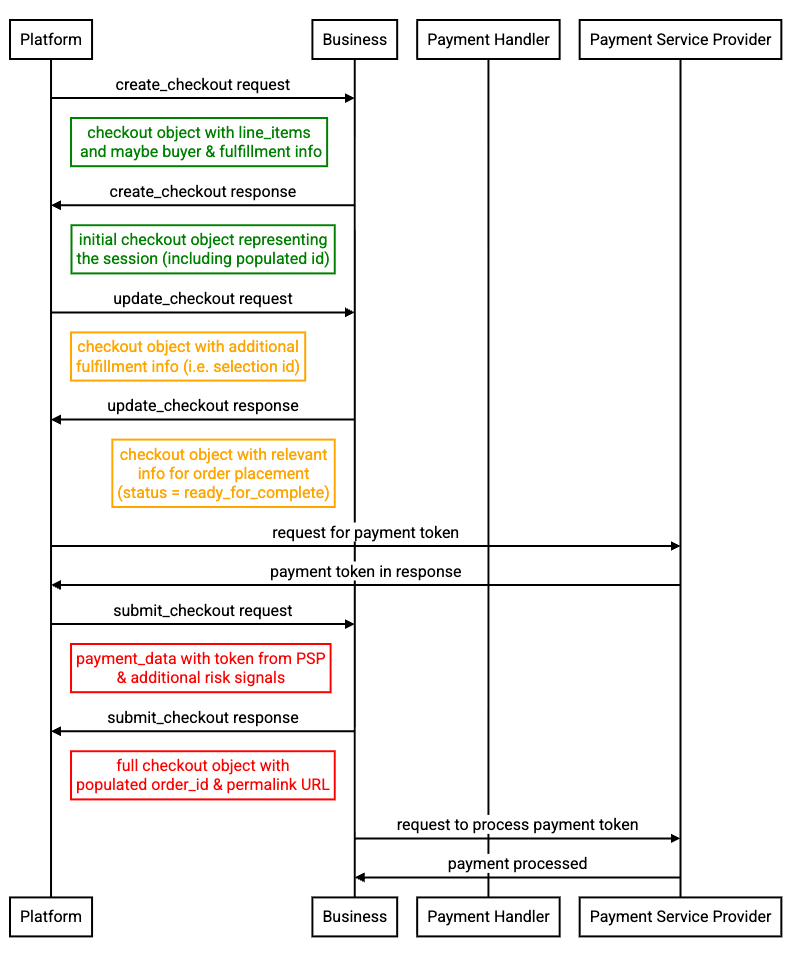
Payments
Payment handlers are discovered from the business's UCP profile at
/.well-known/ucp and checkout.ucp.payment_handlers. The handlers define
the processing specifications for collecting payment instruments
(e.g., Google Pay, Shop Pay). When the buyer submits payment, the platform
populates the payment.instruments array with the collected instrument data.
The payment object is optional on checkout creation and may be omitted for
use cases that don't require payment processing (e.g., quote generation, cart
management).
Businesses may also populate payment.instruments on responses with
display-safe payment instruments from their own user state, such as payment
methods the authenticated buyer has saved with the business. Such an instrument
carries no raw credential: it is a display-safe, business-scoped reference (an
opaque id plus display fields) that the business resolves server-side when
the buyer selects it. The
create checkout REST example already returns
this shape for a Shop Pay instrument. Returning user-specific saved state
requires a user-authenticated request; see
Identity Linking for
the access levels and scopes that gate it.
The display fields let the platform present a saved instrument and let the
buyer recognize it. Whether the instrument can be charged as-is or still
requires credential collection is not distinguished by the base schema today, so
platforms should not infer readiness from the absence of a credential or from
id naming.
Fulfillment
Fulfillment is modelled as an extension in UCP to account for diverse use cases.
Fulfillment is optional in the checkout object. This is done to enable a platform to perform checkout for digital goods without needing to furnish fulfillment details more relevant for physical goods.
Checkout Status Lifecycle
The checkout status field indicates the current phase of the session and
determines what processing is required next. The business sets the status; the
platform receives messages indicating what's needed to progress.
       +------------+                         +---------------------+
       | incomplete |<----------------------->| requires_escalation |
       +-----+------+                         |   (buyer handoff    |
             |                                |  via continue_url)  |
             | all info collected             +----------+----------+
             v                                           |
    +------------------+                                 |
    |ready_for_complete|                                 |
    |                  |                                 |
    | (platform can    |                                 | continue_url
    | call Complete    |                                 |
    |   Checkout)      |                                 |
    +--------+---------+                                 |
             |                                           |
             | Complete Checkout                         |
             v                                           |
   +--------------------+                                |
   |complete_in_progress|                                |
   +---------+----------+                                |
             |                                           |
             +-----------------------+-------------------+
                                     v
                               +-------------+
                               |  completed  |
                               +-------------+

                               +-------------+
                               |  canceled   |
                               +-------------+
          (session invalid/expired - can occur from any state)
Status Values
-
incomplete: Checkout session is missing required information or has issues that need resolution. Platform should inspectmessagesarray for context and should attempt to resolve via Update Checkout. When an active extension surfaces an Action, that instance may identify work the Business needs completed before it can returnready_for_complete. -
requires_escalation: Checkout session requires information that cannot be provided via API, or buyer input is required. Platform should inspectmessagesto understand what's needed (see Error Handling below). If anyrecoverableerrors exist, resolve those first. Then hand off to buyer viacontinue_url. -
ready_for_complete: Checkout session has all necessary information and platform can finalize programmatically. No Action remains outstanding. Platform can call Complete Checkout. -
complete_in_progress: The Complete Checkout request was accepted and the Business is processing the order. The response MUST NOT containorder. An Action can be outstanding in this state. See Actions for how the Platform proceeds. -
completed: Order placed successfully.orderis present and no Action remains outstanding. -
canceled: Checkout session is invalid or expired. Platform should start a new checkout session if needed. No Action remains outstanding.
Actions
When an active extension has outstanding work for the checkout, the Business
surfaces instances under the Action types that extension declares in the
response-only actions map. The common rules are defined in
Overview — Actions; this section states only how the
checkout status lifecycle interprets them.
Status Values is the authoritative home for the status
invariants governing outstanding Actions.
Every Action gates the effect specified for its Action type. While incomplete,
an Action may identify work the Business needs completed before it can return
ready_for_complete. After processing the Action according to its Action type's
contract, the Platform SHOULD use Get Checkout or, outside
complete_in_progress, a subsequent Update Checkout
response to obtain the latest Checkout.
An Action does not select the Checkout status, and a Message's type or severity
does not determine whether the Action gates its Action-defined effect. A Message
can report the outcome of a particular operation. An info or warning Message can
identify an outstanding Action without reporting failure. A recoverable error
Message can identify an Action to report that the requested effect was not
applied because of it. In that case, the Business returns the current Checkout
and sets the Message's path to the exact Action occurrence, as defined in
Overview — Actions. The Message does not turn the Action
into a lock on unrelated Checkout operations.
If an Action prevents Complete Checkout from being accepted, the Business
MUST return the current Checkout with status: incomplete and an error
Message with severity: "recoverable" whose path selects that exact Action
occurrence. Processing the Action does not retry the rejected Complete Checkout
request. A later Complete Checkout request is a new operation under the existing
idempotency rules.
Accepted completion
complete_in_progress means Complete Checkout was accepted. The Checkout state
reported by the Business is authoritative. While a Checkout has this status, the
following operation contract applies:
| Operation | Contract |
|---|---|
| Get Checkout | The Platform MAY invoke Get Checkout; the Business's response is authoritative. The Platform MAY repeat Get Checkout with bounded backoff set by the Action contract or Platform policy, and MUST stop repeated requests at expires_at. |
| Update Checkout | The Platform MUST NOT start a new Update Checkout operation. Duplicate requests remain subject to Replay Protection. If the Business receives a new Update Checkout request, it MUST leave the Checkout unchanged and return the current Checkout with a recoverable error Message. |
| Complete Checkout | The Platform MUST NOT start a new Complete Checkout operation during complete_in_progress. See Complete Checkout for the narrow lost-response recovery retry. |
| Cancel Checkout | The Platform MUST follow the fallback, handoff, and cancellation race rules below before attempting Cancel Checkout. |
When a complete_in_progress Checkout includes an Action, the Platform
processes it according to its Action-type contract. When it contains no Action,
the Platform SHOULD use Get Checkout to observe Business processing.
Because Update Checkout is unavailable after Complete Checkout is accepted, the Business MUST surface any Action that requires input through Update Checkout before accepting Complete Checkout.
After an Action's extension-defined processing completes, the Business might need time to receive and apply its result. The Action completion signal is not authoritative for Checkout state. The Platform MUST use Get Checkout to confirm that the Business reflected the result, for example by removing the Action or changing the Checkout status.
If the same Action key and id remain, the Platform MUST NOT process it
again unless its contract explicitly permits retry and every safe-retry
condition holds. A replacement with a fresh id is new work. If the Action
disappears, that Action is no longer outstanding.
If the Platform cannot complete an Action, or the Business does not update the
Checkout within a timeout set by the Action contract or Platform policy before
expires_at, the Platform SHOULD follow any applicable Action fallback. If
no fallback can continue the Checkout and continue_url is available, the
Platform SHOULD use it to hand off the Checkout to the Buyer. The Platform
MUST NOT attempt Cancel Checkout while either fallback or handoff can still
continue the Checkout.
If neither fallback nor handoff can continue, the Platform SHOULD use Get
Checkout to retrieve the latest state and attempt Cancel Checkout only if it
still reports complete_in_progress. Cancellation can race completion; the
Platform MUST NOT treat the Checkout as canceled unless the Business reports
status: canceled.
Error Handling
The messages array contains errors, warnings, and informational messages
about the checkout state. ucp.status is the shape discriminator —
"success" means the response carries the expected payload, "error"
means it carries error information instead. Each error message carries a type,
code, severity, content, and an optional path that identifies the
specific response component the message refers to, including a field, line
item, or Action occurrence (see The path Field below). The
severity field prescribes the recommended platform action:
| Severity | Meaning | Platform Action |
|---|---|---|
recoverable |
Platform can resolve the condition in band | Modify inputs or process a related Action; submit a new operation when needed |
requires_buyer_input |
Business requires input not available via API | Hand off via continue_url |
requires_buyer_review |
Buyer review and authorization is required | Hand off via continue_url |
unrecoverable |
No resource exists to act on | Retry with new resource or inputs, or hand off via continue_url |
Errors with requires_* severity contribute to status: requires_escalation.
Both result in buyer handoff, but represent different checkout states.
requires_buyer_inputmeans the checkout is incomplete — the business requires information their API doesn't support collecting programmatically.requires_buyer_reviewmeans the checkout is complete — but policy, regulatory, or entitlement rules require buyer authorization before order placement (e.g., high-value order approval, first-purchase policy).
When the business cannot create a new resource or the requested resource
no longer exists, the response contains ucp.status: "error" with
messages describing the failure — no resource is included in the
response body. When no resource exists to act on, messages SHOULD use
severity: "unrecoverable".
For example, a business may reject a create checkout request where all
items are unavailable:
{
  "ucp": { "version": "2026-01-11", "status": "error" },
  "messages": [
    {
      "type": "error",
      "code": "out_of_stock",
      "content": "All requested items are currently out of stock",
      "severity": "unrecoverable"
    }
  ],
  "continue_url": "https://merchant.com/"
}
See REST and MCP binding examples.
Error Processing Algorithm
When status is incomplete or requires_escalation, platforms should process
errors as a prioritized stack. The example below illustrates a checkout with
three error types: a recoverable error (invalid phone), a buyer input
requirement (delivery scheduling), and a review requirement (high-value order).
The latter two require handoff and serve as explicit signals to the platform.
Businesses SHOULD surface such messages as early as possible, and platforms
SHOULD prioritize resolving recoverable errors before initiating handoff.
When a recoverable error's path selects an Action occurrence, the Platform
processes it according to Actions and re-evaluates the latest
Checkout before submitting another operation. The example algorithm below
covers recoverable input errors whose paths do not select Actions.
[
  {
    "type": "error",
    "code": "invalid_phone",
    "severity": "recoverable",
    "path": "$.buyer.phone_number",
    "content": "Phone number format is invalid"
  },
  {
    "type": "error",
    "code": "schedule_delivery",
    "severity": "requires_buyer_input",
    "content": "Select delivery window for your purchase"
  },
  {
    "type": "error",
    "code": "high_value_order",
    "severity": "requires_buyer_review",
    "content": "Orders over $500 require additional verification"
  }
]
Example error processing algorithm:
GIVEN response with messages array

FILTER errors FROM messages WHERE type = "error"

PARTITION errors INTO
  recoverable           WHERE severity = "recoverable"
  requires_buyer_input  WHERE severity = "requires_buyer_input"
  requires_buyer_review WHERE severity = "requires_buyer_review"
  unrecoverable         WHERE severity = "unrecoverable"

IF unrecoverable is not empty
  RETRY with new resource or inputs, or hand off via continue_url
  RETURN

IF recoverable is not empty
  FOR EACH error IN recoverable
    IF error.path is present
      IDENTIFY the field at error.path in the request payload
      ATTEMPT to fix that field (e.g., reformat phone at $.buyer.phone_number)
    ELSE
      ATTEMPT generic fix based on error.code
  CALL Update Checkout
  RETURN and re-evaluate response

IF requires_buyer_input is not empty
  handoff_context = "incomplete, additional input from buyer is required"
ELSE IF requires_buyer_review is not empty
  handoff_context = "ready for final review by the buyer"
Standard Errors
Standard errors are standardized error codes that platforms are expected to handle with specific, appropriate UX rather than generic error treatment.
| Code | Description |
|---|---|
out_of_stock |
Specific item or variant is unavailable |
item_unavailable |
Item cannot be purchased (e.g. delisted) |
address_undeliverable |
Cannot deliver to the provided address |
payment_failed |
Payment processing failed |
eligibility_invalid |
Eligibility claim could not be verified at completion |
Businesses SHOULD mark standard errors with severity: recoverable to
signal that platforms should provide appropriate UX (out-of-stock messaging,
address validation prompts, payment method changes) rather than generic error
messages or deferring to checkout completion.
Example: out_of_stock requires specific upfront UX, whereas
payment_required can be handled generically at submission.
The path Field
The optional path field on a message anchors it to a specific component of the
response payload. Platforms use it to associate messages with an input field,
line item, or Action occurrence — for example, highlighting a specific buyer
field, flagging a cart line, or identifying the Action related to an operation
outcome.
path MUST be an RFC 9535
JSONPath expression relative to the root of the UCP response object. When path
is omitted, the message applies to the response as a whole.
Simple field reference:
Indexed array element:
Action occurrence:
Specificity rule: A path to a specific field (e.g.,
$.line_items[0].quantity) takes precedence over a path to its parent
(e.g., $.line_items[0]). When multiple errors apply to the same field,
each message SHOULD carry the most specific path applicable.
Eligibility Verification at Completion
Platforms provide context.eligibility — buyer claims about eligible benefits
such as loyalty membership, payment instrument perks, and similar. These are
claims, not verified facts. Businesses MAY act on recognized claims during
the session (adjusting pricing, granting product access, applying provisional
discounts), but all accepted claims MUST be resolved before the
transaction can complete.
Unrecognized or inapplicable claims MUST NOT block the checkout.
Businesses SHOULD notify the buyer via messages with type: "warning"
when a claim is not accepted, and MAY use type: "info" to explain
the effects of accepted claims. At completion, accepted claims that remain
unverified MUST result in type: "error" with
code: "eligibility_invalid" (see below).
Eligibility message codes:
| Type | Code | When |
|---|---|---|
warning |
eligibility_not_accepted |
Claim not recognized or not applicable |
info |
eligibility_accepted |
Effect of an accepted claim |
error |
eligibility_invalid |
Accepted claim could not be verified at completion |
A claim is resolved when it is either verified or rescinded:
- Verified: The Business confirms the claim against a proof. UCP does not prescribe how verification occurs — proof may come from the payment credential, an Action surfaced by a negotiated extension, or any other mechanism negotiated between Platform and Business.
- Rescinded: The Platform removes the claim from
context.eligibilitybefore completion (e.g., buyer changes payment method, withdraws a membership claim). Once removed, the Business recalculates without it.
Businesses MUST NOT complete a transaction with unresolved eligibility claims. Unverified claims may result in incorrect pricing or unauthorized access to restricted products.
When verification fails:
The Business MUST return an error in messages with
code: "eligibility_invalid" and severity: "recoverable". When an Action
prevents the requested effect, the Business MUST set that error
Message's path to select the exact Action occurrence as specified in
Actions. Otherwise, the Business SHOULD use path to identify
which specific claim(s) could not be verified. Any Action or discount state
contributed by a negotiated extension MAY remain current according to that
extension. The Platform
MAY then retry that extension's verification flow, use
Update Checkout for ordinary checkout changes (e.g.,
remove ineligible items) or to rescind the claim, or abandon the attempt.
Example: resolving a claim with a verification Action
This example is illustrative. It uses a negotiated vendor extension,
com.example.identity.student_verification, that declares a single Action type
under a key of the same name in actions and defines the instance config and
verification transport. It composes that extension with context.eligibility, a
provisional Discount, an Action, and
messages.
The provisional discount fields (provisional, eligibility) belong to the
Discount extension and are available only when
that extension is active for the checkout.
1. Claim accepted, discount provisional, verification Action outstanding.
The Platform submits org.example.student in context.eligibility on Create
Checkout. The Business accepts the claim and, with the Discount extension
active, returns a provisional discount, an explanatory info message, and a
verification Action. The claim is unresolved, so the checkout stays
incomplete:
{
  "ucp": { ... },
  "id": "chk_student_1",
  "status": "incomplete",
  "currency": "USD",
  "line_items": [ ... ],
  "discounts": {
    "applied": [
      {
        "title": "Student 10% Off",
        "amount": 500,
        "automatic": true,
        "provisional": true,
        "eligibility": "org.example.student"
      }
    ]
  },
  "totals": [ ... ],
  "links": [ ... ],
  "actions": {
    "com.example.identity.student_verification": [
      {
        "id": "verify-student-1",
        "config": {
          "verification_url": "https://business.example.com/verify/abc"
        }
      }
    ]
  },
  "messages": [
    {
      "type": "info",
      "code": "eligibility_accepted",
      "content": "Student discount applied provisionally. Verify your student status to keep it.",
      "path": "$.actions['com.example.identity.student_verification'][0]"
    }
  ]
}
The Platform runs the extension-defined verification flow. The Business receives the outcome out of band. Once that flow is complete, the Platform uses Get Checkout to retrieve the updated state.
2. Verified. The Business resolves the claim: the verification Action is
removed from actions, the discount is confirmed (no longer provisional), and
the explanatory info message is updated. With the claim resolved, the checkout
MAY advance to ready_for_complete.
3. Invalid proof. If the submitted proof does not verify, the claim stays
unresolved. The Business returns an eligibility_invalid error with
severity: recoverable (per When verification fails)
and the checkout does not reach ready_for_complete. The Platform MAY
provide valid proof and retry the verification flow, or rescind the claim.
4. Rescission. The Platform rescinds the claim with an
Update Checkout that removes it from context.eligibility;
the Business then recalculates without the provisional discount.
Warning Presentation
The presentation field on warning messages controls the rendering
contract the platform MUST follow. When omitted, it defaults to
"notice".
notice (default) |
disclosure |
|
|---|---|---|
| Display content | MUST | MUST |
Proximity to path |
MAY | MUST |
| Dismissible | MAY | MUST NOT |
Render image_url |
MAY | MUST |
Render url |
MAY | SHOULD |
| Escalate if cannot honor | — | MUST via continue_url |
notice (default)
The default rendering contract for warnings. Platforms MUST display the warning content to the buyer. Platforms MAY render notices in a banner, tray, or toast, and MAY allow the buyer to dismiss them.
disclosure
Warnings with presentation: "disclosure" carry notices — safety
warnings, allergen declarations, compliance content, etc. — that
MUST follow the prescribed rendering contract below.
Platform requirements:
- MUST display the warning
contentto the buyer. - MUST display the warning in proximity to the component referenced
by
path, preserving the association between the disclosure and its subject. Whenpathis omitted, the disclosure applies to the response as a whole. - MUST NOT hide, collapse, or auto-dismiss the warning.
- MUST render
image_urlwhen present (e.g., warning symbol, energy class label). - SHOULD render
urlas a navigable reference link when present.
Warnings with presentation: "disclosure" SHOULD be given rendering
priority over notices.
Platforms that cannot honor the disclosure rendering contract MUST
escalate to merchant UI via continue_url rather than silently
downgrading to a notice.
Business requirements:
- MUST set
presentation: "disclosure"when the warning content must be displayed alongside a specific component and must not be hidden or auto-dismissed. - SHOULD use the
pathfield to associate disclosures with the relevant component in the response. - SHOULD provide a
codethat identifies the disclosure category (e.g.,prop65,allergens,energy_label). When the disclosure renders a structuredpolicies[]entry, thecodeMUST equal that policy'stypeto link the two (see Policies). - SHOULD provide
image_urlwhen the disclosure has an associated visual element (e.g., warning symbol, energy class label). - SHOULD provide
urlwhen a reference link is available for the buyer to learn more.
Disclosure and Acknowledgment
The presentation field controls how the warning is rendered, not
whether the checkout can proceed. When affirmative buyer acknowledgment
or authorization is also required, the business MAY combine the
disclosure with the escalation mechanisms described in the
Checkout Status Lifecycle to ensure the
appropriate buyer input is obtained.
Jurisdiction and Applicability
It is the business's responsibility to determine which disclosures apply
to a given session and return only those that are relevant. Businesses
SHOULD use buyer-provided data (context and other inputs) and
product attributes to resolve jurisdiction-specific requirements.
Platforms do not affect or resolve disclosure applicability — they render
what they receive from the business.
Example
A checkout response containing both a recoverable error and a disclosure warning on a line item:
{
  "ucp": { "version": "draft", "status": "success", "payment_handlers": { ... } },
  "id": "chk_abc123",
  "status": "incomplete",
  "currency": "USD",
  "line_items": [
    {
      "id": "li_1",
      "item": { "id": "item_456", "title": "Artisan Nut Butter Collection", "price": 1299, "image_url": "https://merchant.com/nut-butter.jpg" },
      "quantity": 1,
      "totals": [
        { "type": "subtotal", "amount": 1299 },
        { "type": "total", "amount": 1299 }
      ]
    }
  ],
  "totals": [
    { "type": "subtotal", "amount": 1299 },
    { "type": "total", "amount": 1299 }
  ],
  "messages": [
    {
      "type": "error",
      "code": "field_required",
      "path": "$.buyer.email",
      "content": "Buyer email is required",
      "severity": "recoverable"
    },
    {
      "type": "warning",
      "code": "allergens",
      "path": "$.line_items[0]",
      "content": "**Contains: tree nuts.** Produced in a facility that also processes peanuts, milk, and soy.",
      "content_type": "markdown",
      "presentation": "disclosure",
      "image_url": "https://merchant.com/allergen-tree-nuts.svg",
      "url": "https://merchant.com/allergen-info"
    }
  ],
  "links": []
}
The platform resolves the recoverable error programmatically while rendering the allergen disclosure in proximity to the referenced line item.
Continue URL
The continue_url field enables checkout handoff from platform to business UI,
allowing the buyer to continue and finalize the checkout session.
Availability
Businesses MUST provide continue_url when returning status =
requires_escalation. For all other non-terminal statuses (incomplete,
ready_for_complete, complete_in_progress), businesses SHOULD provide
continue_url. For terminal states (completed, canceled), continue_url
SHOULD be omitted.
Format
The continue_url MUST be an absolute HTTPS URL and SHOULD preserve
checkout state for seamless handoff. Businesses MAY implement state
preservation using either approach:
Server-Side State (Recommended)
An opaque URL backed by server-side checkout state:
- Server maintains checkout state tied to
checkout_id - Simple, secure, recommended for most implementations
- URL lifetime typically tied to
expires_at
Checkout Permalink
A stateless URL that encodes checkout state directly, allowing reconstruction without server-side persistence. Businesses SHOULD implement support for this format to facilitate checkout handoff and accelerated entry—for example, a platform can prefill checkout state when initiating a buy-now flow.
Note: Checkout permalinks are a REST-specific construct that extends the REST transport binding. Accessing a permalink returns a redirect to the checkout UI or renders the checkout page directly.
Scopes
The Checkout capability defines the following well-known scopes for user-authenticated access:
| Scope | Description |
|---|---|
dev.ucp.shopping.checkout:manage |
All checkout operations on behalf of the authenticated user — create, update, complete, and cancel checkout sessions. |
Scope declaration, derivation, and rules for extending this set with custom scopes are defined in Identity Linking — Scopes.
Guidelines
(In addition to the overarching guidelines)
Platform
- MAY engage an agent to facilitate the checkout session (e.g. add items to the checkout session, select fulfillment address). However, the agent must hand over the checkout session to a trusted and deterministic UI for the user to review the checkout details and place the order.
- MAY send the user from the trusted, deterministic UI back to the agent at any time. For example, when the user decides to exit the checkout screen to keep adding items to the cart.
- MAY provide agent context when the platform indicates that the request was done by an agent.
- MUST use
continue_urlwhen checkout status isrequires_escalation. - MAY use
continue_urlto hand off to business UI in other situations. - When performing handoff, SHOULD prefer business-provided
continue_urlover platform-constructed checkout permalinks.
Business
- MUST send a confirmation email after the checkout has been completed.
- SHOULD provide accurate error messages.
- Logic handling the checkout sessions MUST be deterministic.
- MUST provide
continue_urlwhen returningstatus=requires_escalation. - MUST include at least one message with
severityofrequires_buyer_inputorrequires_buyer_reviewwhen returningstatus=requires_escalation. - SHOULD provide
continue_urlin all non-terminal checkout responses. - After a checkout session reaches the state "completed", it is considered immutable.
Capability Schema Definition 
| Name | Type | Requirement | Description |
|---|---|---|---|
| ucp | any | Required | UCP metadata for checkout responses. |
| id | string | Required | Unique identifier of the checkout session. |
| line_items | Array[Line Item Response] | Required | List of line items being checked out. |
| buyer | Buyer | Optional | Representation of the buyer. |
| context | Context | Optional | Provisional buyer signals for relevance and localization—not authoritative data. Businesses SHOULD use these values when verified inputs (e.g., shipping address) are absent, and MAY ignore or down-rank them if inconsistent with higher-confidence signals (authenticated account, risk detection) or regulatory constraints (export controls). Eligibility and policy enforcement MUST occur at checkout time using binding transaction data. Context SHOULD be non-identifying and can be disclosed progressively—coarse signals early, finer resolution as the session progresses. Higher-resolution data (shipping address, billing address) supersedes context. |
| signals | Signals | Optional | Environment data provided by the platform to support authorization and abuse prevention. Values MUST NOT be buyer-asserted claims — platforms provide signals based on direct observation or independently verifiable third-party attestations. All signal keys MUST use reverse-domain naming to ensure provenance and prevent collisions when multiple extensions contribute to the shared namespace. |
| attribution | Attribution | Optional | Platform-emitted referral and conversion-event context — campaign identifiers, click IDs, source/medium markers, etc. The same parameters platforms communicate via URL query parameters in browser-based flows. |
| status | string | Required | Checkout state indicating the current phase and required processing. See Checkout Status lifecycle documentation for state transition details. Enum: incomplete, requires_escalation, ready_for_complete, complete_in_progress, completed, canceled |
| currency | string | Required | ISO 4217 currency code reflecting the merchant's market determination. Derived from address, context, and geo IP—buyers provide signals, merchants determine currency. |
| totals | Totals | Required | Different cart totals. |
| actions | Actions | Optional | Outstanding extension-defined Actions for this checkout. |
| messages | Array[Message] | Optional | List of messages with error and info about the checkout session state. |
| links | Array[Link] | Required | Links to be displayed by the platform (Privacy Policy, TOS). Mandatory for legal compliance. |
| policies | Array[Policy] | Optional | Policies (e.g., return/refund terms) that apply to the items in this checkout. applies_to targets are relative to the response root; when absent or empty, refer to the URLs in links[]. |
| expires_at | string | Optional | RFC 3339 expiry timestamp. Default TTL is 6 hours from creation if not sent. |
| continue_url | string | Optional | URL for checkout handoff and session recovery. MUST be provided when status is requires_escalation. See specification for format and availability requirements. |
| payment | Payment | Optional | Payment configuration containing handlers. |
| order | Order Confirmation | Optional | Details about an order created for this checkout session. |
Operations
The Checkout capability defines the following logical operations.
| Operation | Description |
|---|---|
| Create Checkout | Initiates a new checkout session. Called as soon as a user adds an item to a cart. |
| Get Checkout | Retrieves the current state of a checkout session. |
| Update Checkout | Updates a checkout session. |
| Complete Checkout | Finalizes the checkout and places the order. |
| Cancel Checkout | Cancels a checkout session. |
Create Checkout
To be invoked by the platform when the user has expressed purchase intent (e.g., click on Buy) to initiate the checkout session with the item details.
Recommendation: To minimize discrepancies and a streamlined user experience, product data (price/title etc.) provided by the business through the feeds SHOULD match the actual attributes returned in the response.
When the Cart capability is negotiated, the request payload
should accept an additional cart_id field for cart-to-checkout conversion. See
Cart → Cart-to-Checkout Conversion for
the field contract.
Inputs
| Name | Type | Requirement | Description |
|---|---|---|---|
| line_items | Array[Line Item] | Required | List of line items being checked out. |
| buyer | Buyer | Optional | Representation of the buyer. |
| context | Context | Optional | Provisional buyer signals for relevance and localization—not authoritative data. Businesses SHOULD use these values when verified inputs (e.g., shipping address) are absent, and MAY ignore or down-rank them if inconsistent with higher-confidence signals (authenticated account, risk detection) or regulatory constraints (export controls). Eligibility and policy enforcement MUST occur at checkout time using binding transaction data. Context SHOULD be non-identifying and can be disclosed progressively—coarse signals early, finer resolution as the session progresses. Higher-resolution data (shipping address, billing address) supersedes context. |
| signals | Signals | Optional | Environment data provided by the platform to support authorization and abuse prevention. Values MUST NOT be buyer-asserted claims — platforms provide signals based on direct observation or independently verifiable third-party attestations. All signal keys MUST use reverse-domain naming to ensure provenance and prevent collisions when multiple extensions contribute to the shared namespace. |
| attribution | Attribution | Optional | Platform-emitted referral and conversion-event context — campaign identifiers, click IDs, source/medium markers, etc. The same parameters platforms communicate via URL query parameters in browser-based flows. |
| payment | Payment | Optional | Payment configuration containing handlers. |
Output
This object MUST be one of the following types: Checkout, Error Response.
Get Checkout
It provides the latest state of the checkout resource. After cancellation or completion it is up to the business on what to return (i.e this can be a long lived state or expire after a particular TTL - resulting in a 'not found' error). From the platform there is no specific enforcement for a TTL of the checkout.
The platform will honor the TTL provided by the business via expires_at at the
time of checkout session creation.
Inputs
| Name | Type | Requirement | Description |
|---|---|---|---|
| id | string | Required | The unique identifier of the checkout session.Defined in path. |
Output
This object MUST be one of the following types: Checkout, Error Response.
Update Checkout
Performs a full replacement of the checkout resource.
The platform is REQUIRED to send the entire checkout resource containing any
data updates to write-only data fields. The resource provided in the request
will replace the existing checkout session state on the business side. This
general replacement rule does not apply during complete_in_progress because
Update Checkout is not permitted; see
Accepted completion for the frozen operation contract.
Inputs
| Name | Type | Requirement | Description |
|---|---|---|---|
| id | string | Required | The unique identifier of the checkout session.Defined in path. |
| line_items | Array[Line Item] | Required | List of line items being checked out. |
| buyer | Buyer | Optional | Representation of the buyer. |
| context | Context | Optional | Provisional buyer signals for relevance and localization—not authoritative data. Businesses SHOULD use these values when verified inputs (e.g., shipping address) are absent, and MAY ignore or down-rank them if inconsistent with higher-confidence signals (authenticated account, risk detection) or regulatory constraints (export controls). Eligibility and policy enforcement MUST occur at checkout time using binding transaction data. Context SHOULD be non-identifying and can be disclosed progressively—coarse signals early, finer resolution as the session progresses. Higher-resolution data (shipping address, billing address) supersedes context. |
| signals | Signals | Optional | Environment data provided by the platform to support authorization and abuse prevention. Values MUST NOT be buyer-asserted claims — platforms provide signals based on direct observation or independently verifiable third-party attestations. All signal keys MUST use reverse-domain naming to ensure provenance and prevent collisions when multiple extensions contribute to the shared namespace. |
| attribution | Attribution | Optional | Platform-emitted referral and conversion-event context — campaign identifiers, click IDs, source/medium markers, etc. The same parameters platforms communicate via URL query parameters in browser-based flows. |
| payment | Payment | Optional | Payment configuration containing handlers. |
Output
This object MUST be one of the following types: Checkout, Error Response.
Complete Checkout
This is the final checkout placement call. To be invoked when the user has
committed to pay and place an order for the chosen items. Complete Checkout
completes checkout and places the order from ready_for_complete.
The response is the checkout object:
- When completion finishes synchronously,
statusiscompletedand theorderfield is present, providing necessary identifiers such asidandpermalink_urlthat can be used to reference the full state of the placed order. - When completion is accepted for asynchronous processing,
statusiscomplete_in_progressand noorderis present. The Platform follows Accepted completion for Business processing and any outstanding Action. - Any other status retains its core
Checkout status lifecycle semantics — for
example
incompletefor a recoverable change, orrequires_escalationfor Buyer handoff.
The Platform MUST NOT use Complete Checkout to poll or resume accepted
processing. If the Platform does not receive a response to Complete Checkout, it
SHOULD use Get Checkout with bounded backoff to obtain the current state and
MUST stop at expires_at. Only if Get Checkout still does not establish
whether the Business processed the original request, the Platform MAY submit
the identical original Complete Checkout request again with the same idempotency
key. The Platform MUST NOT use a new idempotency key for that retry.
A genuinely new Complete Checkout operation after the Checkout returns to
ready_for_complete
MUST use a fresh idempotency key, even if the payload is unchanged.
At the time of order persistence, fields from Checkout MAY be used
to construct the order representation (i.e. information like line_items,
fulfillment will be used to create the initial order representation).
After the order is placed, other details will be updated through subsequent events as the order, and its associated items, move through the supply chain.
Inputs
| Name | Type | Requirement | Description |
|---|---|---|---|
| id | string | Required | The unique identifier of the checkout session.Defined in path. |
| signals | Signals | Optional | Environment data provided by the platform to support authorization and abuse prevention. Values MUST NOT be buyer-asserted claims — platforms provide signals based on direct observation or independently verifiable third-party attestations. All signal keys MUST use reverse-domain naming to ensure provenance and prevent collisions when multiple extensions contribute to the shared namespace. |
| attribution | Attribution | Optional | Platform-emitted referral and conversion-event context — campaign identifiers, click IDs, source/medium markers, etc. The same parameters platforms communicate via URL query parameters in browser-based flows. |
| payment | Payment | Required | Payment configuration containing handlers. |
Output
This object MUST be one of the following types: Checkout, Error Response.
Cancel Checkout
This operation will be used to cancel a checkout session, if it can be canceled.
If the checkout session cannot be canceled (e.g. checkout session is
already canceled or completed), then businesses SHOULD send back an error
indicating the operation is not allowed. Any checkout session with a status
that is not equal to completed or canceled SHOULD be cancelable.
Inputs
| Name | Type | Requirement | Description |
|---|---|---|---|
| id | string | Required | The unique identifier of the checkout session.Defined in path. |
Output
This object MUST be one of the following types: Checkout, Error Response.
Transport Bindings
The abstract operations above are bound to specific transport protocols as defined below:
- REST Binding: RESTful API mapping using standard HTTP verbs and JSON payloads.
- MCP Binding: Model Context Protocol mapping for agentic interaction.
- A2A Binding: Agent-to-Agent Protocol mapping for agentic interactions.
- Embedded Checkout Binding: JSON-RPC for powering embedded checkout.
Entities
Buyer
| Name | Type | Requirement | Description |
|---|---|---|---|
| first_name | string | Optional | First name of the buyer. |
| last_name | string | Optional | Last name of the buyer. |
| string | Optional | Email of the buyer. | |
| phone_number | string | Optional | E.164 standard. |
Context
Context signals are provisional—not authoritative data. Businesses SHOULD use these values when verified inputs (e.g., shipping address) are absent, and MAY ignore or down-rank them if inconsistent with higher-confidence signals (authenticated account, risk detection) or regulatory constraints (export controls). Eligibility and policy enforcement MUST occur at checkout time using binding transaction data.
| Name | Type | Requirement | Description |
|---|---|---|---|
| address_country | string | Optional | The country, as a 2-letter ISO 3166-1 alpha-2 code (e.g. "US"). A 3-letter alpha-3 code or full country name MAY also be used. |
| address_region | string | Optional | The first-level administrative region within the country (e.g. a state or province such as California). |
| postal_code | string | Optional | The postal code (e.g. "94043"). |
| intent | string | Optional | Background context describing buyer's intent (e.g., 'looking for a gift under $50', 'need something durable for outdoor use'). Informs relevance, recommendations, and personalization. |
| language | string | Optional | Preferred language for content. Use IETF BCP 47 language tags (e.g., 'en', 'fr-CA', 'zh-Hans'). For REST, equivalent to Accept-Language header—platforms SHOULD fall back to Accept-Language when this field is absent; when provided, overrides Accept-Language. Businesses MAY return content in a different language if unavailable. |
| currency | string | Optional | Preferred currency (ISO 4217, e.g., 'EUR', 'USD'). Businesses determine presentment currency from context and authoritative signals; this hint MAY inform selection in multi-currency markets. Also serves as the denomination for price filter values — platforms SHOULD include this field when sending price filters. Response prices include explicit currency confirming the resolution. |
| eligibility | Array[Reverse Domain Name] | Optional | Buyer claims about eligible benefits such as loyalty membership, payment instrument perks, and similar. Recognized claims MAY inform the Business response (e.g., member-only product availability, adjusted pricing in catalog, provisional discounts at cart or checkout). Businesses MUST ignore unrecognized values without error. Values MUST use reverse-domain naming (e.g., 'com.example.loyalty_gold', 'org.school.student') and MUST be non-identifying. |
| payment | Array[object] | Optional | Buyer-preferred payment handlers in priority order (most preferred first). Each entry names a handler advertised in the Business profile's ucp.payment_handlers, optionally narrowed to preferred instrument types. The Business SHOULD use it to preselect or prioritize the handler (and type, when given) and MAY ignore unavailable or ineligible entries; unrecognized values MUST be ignored without error. |
Signals
Environment data provided by the platform to support authorization
and abuse prevention. Unlike context (buyer-asserted preferences) and buyer
(self-reported identity), signal values MUST NOT be buyer-asserted claims —
platforms provide signals based on direct observation or by relaying
independently verifiable third-party attestations. See
Signals for details and privacy
requirements.
| Name | Type | Requirement | Description |
|---|---|---|---|
| dev.ucp.buyer_ip | string | Optional | Client's IP address (IPv4 or IPv6). |
| dev.ucp.user_agent | string | Optional | Client's HTTP User-Agent header or equivalent. |
Attribution
Platform-provided referral and conversion-event context — campaign IDs, click identifiers, and source/medium markers communicated by the platform. See Attribution for details and consent requirements.
Platform-emitted referral and conversion-event context — campaign identifiers, click IDs, source/medium markers, etc. The same parameters platforms communicate via URL query parameters in browser-based flows.
Item
Item Create Request
| Name | Type | Requirement | Description |
|---|---|---|---|
| id | string | Required | The product identifier, often the SKU, required to resolve the product details associated with this line item. Should be recognized by both the Platform, and the Business. |
Item Update Request
| Name | Type | Requirement | Description |
|---|---|---|---|
| id | string | Required | The product identifier, often the SKU, required to resolve the product details associated with this line item. Should be recognized by both the Platform, and the Business. |
Item
| Name | Type | Requirement | Description |
|---|---|---|---|
| id | string | Required | The product identifier, often the SKU, required to resolve the product details associated with this line item. Should be recognized by both the Platform, and the Business. |
| title | string | Required | Product title. |
| price | Amount | Required | Unit price in ISO 4217 minor units. |
| image_url | string | Optional | Product image URI. |
Line Item
Line Item Create Request
| Name | Type | Requirement | Description |
|---|---|---|---|
| item | Item | Required | |
| quantity | integer | Required | Quantity of the item being purchased. |
Line Item Update Request
| Name | Type | Requirement | Description |
|---|---|---|---|
| id | string | Optional | |
| item | Item | Required | |
| quantity | integer | Required | Quantity of the item being purchased. |
| parent_id | string | Optional | Parent line item identifier for any nested structures. |
Line Item
| Name | Type | Requirement | Description |
|---|---|---|---|
| id | string | Required | |
| item | Item | Required | |
| quantity | integer | Required | Quantity of the item being purchased. |
| totals | Array[Total] | Required | Line item totals breakdown. |
| parent_id | string | Optional | Parent line item identifier for any nested structures. |
Link
See Link in the Schema Reference for the canonical field definition.
Well-Known Link Types
Businesses SHOULD provide all relevant links for the transaction. The following are the recommended well-known types:
| Type | Description |
|---|---|
privacy_policy |
Link to the business's privacy policy |
terms_of_service |
Link to the business's terms of service |
refund_policy |
Link to the business's refund policy |
shipping_policy |
Link to the business's shipping policy |
faq |
Link to the business's frequently asked questions |
Businesses MAY define custom types for domain-specific needs. Platforms
SHOULD handle unknown types gracefully by displaying them using the title
field or omitting them.
Policy
Policies (return/refund terms, warranty, and the like) that apply to the items
in this checkout. JSONPath targets in applies_to are relative to
this response root (e.g., $.line_items[0]). See
Policies for the full model.
| Name | Type | Requirement | Description |
|---|---|---|---|
| type | Reverse Domain Name | Required | Policy type discriminator. Open reverse-DNS vocabulary. Well-known values: dev.ucp.shopping.policy.return (return terms), dev.ucp.shopping.policy.warranty (warranty terms). Businesses MAY define custom types in their own domain (e.g., com.example.policy.price_match). Platforms MUST tolerate unknown values. |
| description | Description | Required | Human-readable policy summary in one or more formats (plain, markdown, html). Required on every policy so a platform can present it without understanding any type-specific fields. This is not the buyer-facing disclosure — display is compelled by a messages[] warning (see the Policies section). |
| applies_to | Array[string] | Optional | RFC 9535 JSONPath expressions identifying the nodes this policy applies to, relative to the embedding response root (e.g., $.line_items[0] in cart/checkout, $.products[2] in catalog). Each target covers the node it names and everything nested under it, so a target on a product also covers its variants. A singular query (RFC 9535 Section 2.3.5.1; name and index selectors only) names a single node; filters, wildcards, and slices match a set. When omitted, the policy applies to the entire response. When policies of the same type contest a node, the narrowest target wins and overrides the rest. See the Policies section for how specificity resolves. |
| url | string | Optional | Optional link to the full policy document. |
Message
See Message in the Schema Reference for the canonical field definition.
Message Error
See Message Error in the Schema Reference for the canonical field definition.
Error Code
See Error Code in the Schema Reference for the canonical field definition.
Message Info
See Message Info in the Schema Reference for the canonical field definition.
Message Warning
See Message Warning in the Schema Reference for the canonical field definition.
Payment
| Name | Type | Requirement | Description |
|---|---|---|---|
| instruments | Array[Payment Instrument Selected Payment Instrument] | Optional | The payment instruments available for this payment. Each instrument is associated with a specific handler via the handler_id field. Handlers can extend the base payment_instrument schema to add handler-specific fields. |
Selected Payment Instrument
A payment instrument with selection state.
| Name | Type | Requirement | Description |
|---|---|---|---|
| id | string | Required | A unique identifier for this instrument instance. Typically assigned by the platform for instruments it collects. For a business-owned saved instrument returned on an identity-linked response, this identifier is assigned by the business; the platform MUST treat it as an opaque, business-scoped reference, and the business resolves it server-side when the buyer selects it. |
| handler_id | string | Required | The unique identifier for the handler instance that produced this instrument. This corresponds to the 'id' field in the Payment Handler definition. |
| type | string | Required | The broad category of the instrument (e.g., 'card', 'tokenized_card'). Specific schemas will constrain this to a constant value. |
| billing_address | object | Optional | The billing address associated with this payment method. |
| credential | object | Optional | The base definition for any payment credential. Handlers define specific credential types. |
| display | object | Optional | Display information for this payment instrument. Each payment instrument schema defines its specific display properties, as outlined by the payment handler. |
| selected | boolean | Optional | Whether this instrument is selected by the user. |
Payment Credential
| Name | Type | Requirement | Description |
|---|---|---|---|
| type | string | Required | The credential type discriminator. Specific schemas will constrain this to a constant value. |
Postal Address
See Postal Address in the Schema Reference for the canonical field definition.
Response
Capability reference in responses. Only name/version required to confirm active capabilities.
| Name | Type | Requirement | Description |
|---|---|---|---|
| version | string | Required | Entity version in YYYY-MM-DD format. |
| spec | string | Optional | URL to human-readable specification document. |
| schema | string | Optional | URL to JSON Schema defining this entity's structure and payloads. |
| id | string | Optional | Unique identifier for this entity instance. Used to disambiguate when multiple instances exist. |
| config | object | Optional | Entity-specific configuration. Structure defined by each entity's schema. |
| extends | OneOf[string, array] |
Optional | Parent capability(s) this extends. Present for extensions, absent for root capabilities. Use array for multi-parent extensions. |
Total
| Name | Type | Requirement | Description |
|---|---|---|---|
| type | string | Required | Cost category. Well-known values: subtotal, items_discount, discount, fulfillment, tax, fee, total. Businesses MAY use additional values. |
| display_text | string | Optional | Text to display against the amount. Should reflect appropriate method (e.g., 'Shipping', 'Delivery'). |
| amount | Signed Amount | Required | Monetary amount in the currency's minor unit as defined by ISO 4217. Refer to the currency's exponent to determine minor-to-major ratio (e.g., 2 for USD, 0 for JPY, 3 for KWD). May be negative — the sign is intrinsic to the value (e.g., discounts are negative, charges are positive). |
Rendering Contract
Businesses are the authoritative source for presented totals — their content and order — because the correct presentation is subject to regional, product, and regulatory requirements that the business is obligated to satisfy (e.g., multi-jurisdiction tax itemization, mandatory fee disclosures).
Platforms MUST render all top-level entries in the order provided:
Platforms MAY render sub-lines as supplementary detail:
for entry in totals:
    render_line(entry.display_text, entry.amount)
if entry.lines:
for sub in entry.lines:
render_detail_line(sub.display_text, sub.amount)
Platforms MUST NOT interpret, filter, reorder, aggregate, or apply display logic of their own.
Invariants of totals[]:
- Every entry carries a
typeand anamount. Platforms SHOULD usedisplay_textwhen provided. Well-known types have default display labels as fallback (see table below); unknown types MUST includedisplay_text. - Amounts are signed integers — negative values are subtractive (e.g., discounts), positive values are additive. The sign IS the direction.
- Exactly one
type: "subtotal"MUST be present. - Exactly one
type: "total"MUST be present.
Verification
Platforms MUST NOT substitute their own computed totals for the business's values. Platforms MAY verify the provided totals:
If the computed sum does not match the type: "total" entry, the platform
MUST NOT alter the rendered output — the business's presented totals are
authoritative for display. However, platforms MUST NOT autonomously complete
a checkout with mismatched totals. Platforms SHOULD reject the checkout or
escalate and ask for buyer review via continue_url.
Well-Known Types
| Type | Sign | Default label | Meaning |
|---|---|---|---|
subtotal |
+ | Subtotal | Sum of line item prices |
discount |
− | Discount | Order or line-item level discount |
items_discount |
− | Item Discounts | Rollup of line-item discounts |
fulfillment |
+ | Shipping | Shipping, delivery, or pickup charges |
tax |
+ | Tax | Tax charges |
fee |
+ | Fee | Fees and surcharges |
total |
= | Total | Authoritative grand total (exactly one) |
When display_text is provided, platforms MUST use it. When omitted on a
well-known type, platforms SHOULD use the default label above. The sign
convention for well-known types is schema-enforced: subtractive types
(discount, items_discount) MUST have negative amounts; additive types
(subtotal, fulfillment, tax, fee) MUST have non-negative amounts.
The type field is an open string — businesses MAY use values beyond the
well-known set. Unknown types MUST include display_text (schema-enforced)
and the sign on the amount is self-describing.
Repeating Types
All types except subtotal and total MAY appear multiple times —
for example, multi-jurisdiction tax lines or itemized fees.
Sub-Lines (lines)
Each top-level entry MAY include a lines array. Sub-lines share the same
base shape as top-level entries — display_text and amount — providing an
itemized breakdown under the parent.
Invariant: sum(lines[].amount) MUST equal the parent entry's amount.
The business controls what MUST be rendered (top-level entries) versus what MAY be optionally surfaced (sub-lines). Platforms SHOULD render sub-lines when provided.
Examples
Split tax, itemized at top-level:
[
  { "type": "subtotal",    "display_text": "Subtotal",    "amount": 5750 },
  { "type": "fulfillment", "display_text": "Shipping",    "amount": 899 },
  { "type": "tax",         "display_text": "Federal Tax", "amount": 332 },
  { "type": "tax",         "display_text": "State Tax",   "amount": 465 },
  { "type": "total",       "display_text": "Total",       "amount": 7446 }
]
Collapsed fees with optional breakdown:
[
  { "type": "subtotal", "display_text": "Subtotal", "amount": 4999 },
  {
    "type": "fee", "display_text": "Fees", "amount": 549,
    "lines": [
      { "display_text": "Service Fee", "amount": 399 },
      { "display_text": "Recycling Fee", "amount": 150 }
    ]
  },
  { "type": "tax",   "display_text": "Tax",   "amount": 444 },
  { "type": "total", "display_text": "Total", "amount": 5992 }
]
Discount and account credit — negative amounts:
[
  { "type": "subtotal",       "display_text": "Subtotal",       "amount": 10000 },
  { "type": "discount",       "display_text": "Summer Sale",    "amount": -1500 },
  { "type": "tax",            "display_text": "Tax",            "amount": 680 },
  { "type": "account_credit", "display_text": "Account Credit", "amount": -2500 },
  { "type": "total",          "display_text": "Amount Due",     "amount": 6680 }
]
UCP Response Checkout
UCP metadata for checkout responses.
| Name | Type | Requirement | Description |
|---|---|---|---|
| version | string | Required | UCP version in YYYY-MM-DD format. |
| status | string | Optional | Application-level status of the UCP operation. Enum: success, error |
| services | object | Optional | Service registry keyed by reverse-domain name. |
| capabilities | object | Optional | Capability registry keyed by reverse-domain name. |
| payment_handlers | object | Required | Payment handler registry keyed by reverse-domain name. |
| services | any | Optional | |
| capabilities | any | Optional | |
| payment_handlers | any | Required |
Order Confirmation
| Name | Type | Requirement | Description |
|---|---|---|---|
| id | string | Required | Unique order identifier. |
| label | string | Optional | Human-readable label for identifying the order. MUST only be provided by the business. |
| permalink_url | string | Required | Permalink to access the order on merchant site. |
Error Response 
See Error Response in the Schema Reference for the canonical field definition.